Ever noticed and wondered why the well-known SQL Server system administrator (sa) login is in a disabled state?
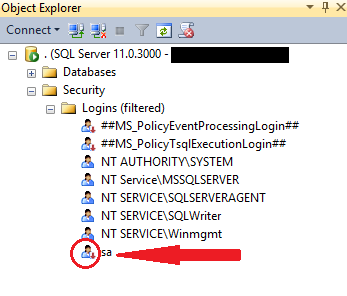
The reason is simple, sa login account is disabled out of the box (by default) in Windows Authentication mode. You have to enable manually to use it.
On the other hand, if you request Mixed Mode Authentication during installation, SQL Server Setup prompts you to set an sa login password. So sa login account is enabled in this case.
Enable/Disable sa login using SSMS GUI:
- From the Object Explorer, expand “Security” and then expand “Logins” –> Right click on sa and select “Properties”

- On the “General” tab, create a strong password

- On the “Status” tab, click “Enabled”, and then click “ok” (If sa is already enabled, you have to chose “Disabled” to disable the same)

Enable sa login using T-SQL script:
ALTER LOGIN sa ENABLE ;
GO
ALTER LOGIN sa WITH PASSWORD = '$trongPa$$w@rD';
GO
Disable sa login using T-SQL script:
ALTER LOGIN sa DISABLE ;
GO
Here’s some more info about “sa” account:
- System administrator (sa) is a special login provided for backward compatibility
- Usually there is no effect sa being in a disabled state though it pertains and owns the system databases
- By default, sa login is assigned to the sysadmin fixed server role and cannot be changed
- Microsoft do not recemmond using sa login in application (as it is often targeted by malicious users)
- However, Microsoft recommonds using sa only when there is no other way to log in to an instance
- The sa login cannot be removed/deleted
Technical Reviewer: Jaipal Vajrala


 Hareesh G
 Jayapal Vajrala
 Suresh Raavi
 DataGinger.com
Enable sa login using T-SQL script: helped me. Thank you.
it’s not working ……
You also need to enable ‘SQL Server and Windows Authentication mode’ under Server Properties
[…] For more information on sa account you can check my previous blog post HERE […]
[…] SQL Server – Why is the ‘sa’ Login Account Disabled & How … – Ever noticed and wondered why the well-known SQL Server system administrator (sa) login is in a disabled state? The reason is simple, sa login account is disabled out … […]
This article worked perfectly for me. I didn’t have SSMS installed on the pc, so I put the T-SQL script statements into a sql file, set the correct password, and ran it from the command prompt like so:
>Sqlcmd -S.\SQLEXPRESS -i c:\temp\sqlfile.sql
… this successfully enabled the sa account.
Many thanks
[…] SQL Server – Why is the ‘sa’ Login Account Disabled & How … […]
[…] SQL Server – Why is the ‘sa’ Login Account Disabled & How … […]
[…] SQL Server – Why is the ‘sa’ Iniciar Sesion Account Disabled & How … […]
[…] » Visit Now Aug 20, 2013 · SQL Server – Why is the ‘sa’ Login Account Disabled & How to Enable ‘sa’ Login Account August 20, 2013 by Suresh Raavi Ever noticed and wondered why the well-known SQL Server system administrator ( sa ) login is in a disabled state? […]
[…] » Visit Now Aug 20, 2013 · SQL Server – Why is the ‘sa’ Login Account Disabled & How to Enable ‘sa’ Login Account. August 20, 2013 by Suresh Raavi. Ever noticed and wondered why the well-known SQL Server system administrator (sa) login is in a disabled state? The reason is simple, sa login account is disabled out of the box (by default) in Windows … […]