Feeds:
Posts
Comments

Posts Tagged ‘SQL Server 2008 R2’

Today we got an escalation where on one of the servers ‘Agent XPs’ was in a disabled state. And when looked at SQL Server Agent node, it is displayed in Red which basically indicates SQL Agent Service is not running, however when checked the Agent Services are actually running, which is misleading!

AgentXps

So here is some basic information I gathered about Agent XPs option – only found in SQL Server 2005 and above versions

Summing up from MSDN BOL:

  • When Agent XPs is not enabled (which makes Agent extended stored procedures are not enabled), SSMS does not display the contents of the SQL Server Agent node regardless of the SQL Server Agent service state.
  • Hence, in order to enable the SQL Server Agent extended stored procedures on the server, Agent XPs should be enabled
  • When SQL Server Management Studio tool is used to start the SQL Server Agent service, these extended stored procedures are enabled automatically, which should enable Agent XPs server configuration option.

It is not very clear from BOL what makes Agent XPs setting enable/disable, so I dug more into this and here is some brief notes:

  • I Installed a local instance (SQL 2012) on my machine and did a few test scenarios which confirms that Agent XPs option will be enabled automatically when SQL Agent Services are started, either with Manual mode or Automatic mode.
  • And whenever the SQL Agent service is started or stopped regardless of the SQL Agent start mode (Manual/Automatic), it will enable or disable the Agent XPs respectively.
  • Hence, if SQL Agent is stopped and don’t restart – it will disable the Agent XPs option(even though we enabled the Agent XPs prior to stopping SQL Agent)
  • When the Agent XPs option is disabled, we cannot access any SQL Agent nodes or even its properties from SSMS.
  • Vice-versa, when the Agent XPs option is enabled, we can access SQL Agent nodes and properties from SSMS whether or not SQL Agent services are running or stopped
  • And, from the above observations, it is clear says that Agent XPs option disabled doesn’t mean that SQL Agent services are stopped

Finally from my understanding most of the time Agent XPs option shouldn’t be an issue since whenever the SQL Agent services are started the Agent XPs option will be automatically enabled.

If this option is disabled, either the SQL Agent services never started or Agent XPs option might have disabled due to some reasons.. such as security patching on the servers (which can be enabled anytime using a simple script which doesn’t need Agent/Server restart).

--To check if Agent XPs option is enabled or not 
--(show advanced options must be enabled for this)
EXEC SP_CONFIGURE 'Agent XPs'
GO 
--To enable show advanced options
EXEC SP_CONFIGURE 'show advanced options', 1
GO
RECONFIGURE
GO
--To see advanced options
EXEC SP_CONFIGURE 'show advanced options'
GO
--To enable Agent XPs option
EXEC SP_CONFIGURE 'Agent XPs', 1
GO
RECONFIGURE
GO
Read Full Post »

Before writing this post, even I am not clear about the title of this post. So, I did a test scenario on AdventureWorks2012 sample database to answer the below two questions:

  • Is compressing the Table the same as compressing the Clustered Index on that table?
  • What to compress on a HEAP table and what to compress on a NON-HEAP table?

First let’s check if Compressing the table is the same as compressing Clustered Index or not (I haven’t found much information from BOL). I chosed “Sales.SalesOrderDetail” table from “AdventureWorks2012” sample database for the test.

And below are the test results:

Space Usage rows reserved data index_size unused
prior to compression 121317 17920 KB 10896 KB 6528 KB 496 KB
after compressing Clustered Index (CI) 121317 12224 KB 5240 KB 6528 KB 456 KB
after removing compression on CI 121317 17856 KB 10896 KB 6528 KB 432 KB
after Table compression 121317 12224 KB 5240 KB 6528 KB 456 KB

In conclusion to say a table is FULLY compressed (FULLY in this context I mean compression including data and index space)From the results above, it can be concluded that Compressing the Clustered Index is nothing but compressing the Table itself. And Non-Clustered Indexes has to be compressed separately (as they are separately stored structures)

On a NON-HEAP table we have to compress:

  • Either Clustered Index OR Table AND
  • Non Clustered Indexes (if any)

On a HEAP table we have to compress:

  • Table AND
  • Non Clustered Indexes (if any)

NON-HEAP Table: Table with Clustered Index
HEAP Table: Table with no Clustered Index

Queries Used:

--1. To know the space usage
Exec Sp_spaceused '[Sales].[SalesOrderDetail]'
GO
--2. To compress Clustered Index
ALTER INDEX [PK_SalesOrderDetail_SalesOrderID_SalesOrderDetailID]
ON [Sales].[SalesOrderDetail]
REBUILD
WITH ( DATA_COMPRESSION = PAGE )
GO
--3. To remove the compression on Clustered Index
ALTER INDEX [PK_SalesOrderDetail_SalesOrderID_SalesOrderDetailID]
ON [Sales].[SalesOrderDetail]
REBUILD
WITH ( DATA_COMPRESSION = NONE )
GO
--4. To compress the table
ALTER TABLE [Sales].[SalesOrderDetail]
REBUILD WITH (DATA_COMPRESSION = PAGE)

Read Full Post »

Does a database allows to create multiple mdf files? Let’s check here

Until recently I am on the assumption that a database can only have one data file with the *.mdf extension.

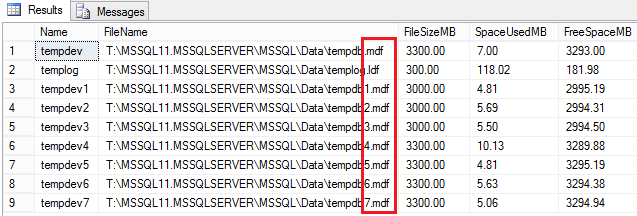
While checking the tempDB configuration on one of our production servers, I noticed tempDB having multiple data files with .mdf extension as shown in the screenshot below.

Can a Database have more than one mdf file 1

However, I expected the tempDB to be having only one .mdf file and multiple .ndf files, which is the way I have been seeing all these years.

To test it by myself (which I always prefer) I tried creating more than one data file with *.mdf extension on a database, and ofcourse YES, it accepted without any issues.

Reason: The primary data file shouldn’t necessarily have to be a .mdf extension

  • A primary data file is the data file associated when first created the database, and YES this can only be one

Does the .mdf/.ndf/.ldf file extensions really matter?

  • NO, SQL Server does not enforce the .mdf, .ndf, and .ldf file name extensions, these extensions help us identify the different kinds of files and their use.

Microsoft’s recommended file name extension for primary data files is .mdf. Similarly for secondary data files is .ndf and for transaction log file is .ldf. However, I can have any extension (something like .xyz) for any file (primary/secondary/log). Please refer to the screenshot below for an example of database created with different FileName extensions.

Can a Database have more than one mdf file 2

So, how does SQL Server know the file we are adding is a data file or log file ?

  • If using GUI, in the File Type we mention either “Rows Data” or “Log”
  • If using T-SQL, ALTER DATABASE DbName ADD FILE… or ALTER DATABASE DbName ADD LOG FILE

In Conclusion: Yes, we can create multiple data files with .mdf extension for a database either on an already existing filegroup or by creating a new filegroup. Generally speaking secondary files have a .ndf extension (not necessarily though!), but you can give it whatever extension you want, and it will work correctly.

Read Full Post »

« Newer Posts

Design a site like this with WordPress.com
Get started